Posts

Log4Net AdoNetAppender using SQL Server Express DB instead of LocalDB

Problem After turning on Log4Net debugging by adding the followings to the windows service project App.config file:   <appSettings>    <add key="log4net.Internal.Debug" value="true"/>   </appSettings>   <system.diagnostics>     <trace autoflush="true">       <listeners>         <add           name="textWriterTraceListener"           type="System.Diagnostics.TextWriterTraceListener"           initializeData="C:\Temp\log4net.log" />       </listeners>     </trace>   </system.diagnostics> Configuring Log4Net AdoNetAppender with LocalDB  has not worked  due to the following error: System.Data.SqlClient.SqlException (0x80131904): Cannot open database "Log4NetDB" requested by the login. The login failed. Login failed for user 'N...

How to reinstall Dell E7440 Laptop

Problem My friend asked for help to reinstall her Dell E7440 laptop that's running Windows 8 Pro however she didn't have the recovery disk. If possible she'd like to have Windows 10 Pro. Solution Reboot the laptop and press F2 to get to the BIOS Setup screen. Get the service tag from BIOS and take note. Download Dell OS Recovery Tool from  https://www.dell.com/support/home/au/en/audhs1/drivers/osiso/recoverytool/wt64a Insert 8GB SDCard then run the executable and when prompted enter the service tag. Reboot the laptop and press F12 to go to boot menu. Select UEFI: SDCARD as the boot drive and follow the installation wizard. After the installation, download Windows 10 installer from  https://www.microsoft.com/en-au/software-download/windows10 Run setup for Windows 10 . When it's complete, the Windows 10 Pro will be already activated with proper licence that comes with the Dell Laptop. Finish. Note: If you encounter any problem with reboot (i.e. n...

How to restart VirtualBox VM to certain snapshot via Ubuntu Terminal

Problem I need to restart my VirtualBox headless Virtual Machine and restore it to certain snapshot on every restart. Solution 1. On Ubuntu terminal type the following commands to create a bash script as follows: cd /user/bin sudo nano vboxmanage-restartMyVM 2. On the nano editor type the followings: vboxmanage controlvm " YourVMName " poweroff vboxmanage snapshot " YourVMName " restore " YourVMSnapshotName " vboxmanage startvm " YourVMName " -type headless 3. Press Ctrl-S to save the file and Ctrl-X to exit the editor and return to Ubuntu terminal. 4. Type the following command to allow the script to be executable sudo chmod +x vboxmanage-restartMyVM 5. Finish. Now everytime I type  vboxmanage-restartMyVM  on the Ubuntu terminal my virtual machine will be powered-off if it's on, restored to my preferred snapshot, then started. Happy day😀

How to replace battery of Honda Jazz Remote Key

Image
I've just replaced the battery on my Honda Jazz Remote Key. The coin lithium battery type is CR1616. The following video shows how I did it:

How to replace front parking bulb of Honda Jazz 2009

Image
I've just replaced the front parking bulb (5W 12V T10) of my Honda Jazz 2009. If you want to save a trip to a workshop by doing it yourself, please watch my youtube channel https://youtu.be/g1XZPGlnckU Please like and subscribe if you want more video like this in the future. Thanks.

How to repeat Tablix header on every page of SSRS report

Image
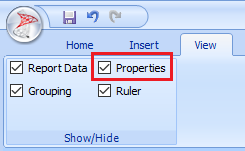
Problem After paginating the SSRS report on the previous article , I encountered another problem displaying Tablix header on multiple pages. Solution Ensure View | Properties is checked Click on the following  triangle icon  to select  Advanced Mode Click on the first static on the Row Groups and set the Tablix Member | Other | KeepWithGroup:After and RepeatOnNewPage:True Explanation The selected (static) row to repeat on the new page was actually the header of the table (Tablix). You can visually identify the highlighted-part of Tablix as you click on the (static) row on the Row Groups. If you want the header to display on browser when scrolling down, ensure Tablix Member | Other | FixedData: True

How to paginate SSRS Report to solve rendering performance issue on Internet Explorer

Image
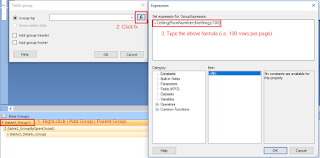
Problem I've encountered slow performance issue on SSRS report rendering on Internet Explorer. It took 15 minutes to render a report on IE. Solution Right-click on the first row of Row Groups and select Add Group | Parent Group... Click fx button when prompted When prompted Set expression for: GroupExpression, type the following formula: =Ceiling(RowNumber(Nothing)/100)  then click OK | OK. Ensure Page Breaks | Between each instance of a group is checked Remember to delete the Sorting fx that was automatically populated otherwise you may encounter error when saving the changes: Right-click on the newly created group ( Group1 ) and select Delete Columns  | Delete group only then click OK . Explanation You can adjust the number of row per page (i.e. changing 100 on the formula to any number) to suit your needs however this pagination will affect interactive and non-interactive rendering. Also if you need to paginate the subsequent row (second, third, etc.) ...