Posts

How to use Raspberrypi VPN server to wake up other computer

Image
Problem I need to be able to power-on my Theatre PC remotely and securely over my VPN at home. Solution I have already an OpenVPN server installed on Raspberrypi so I just need to install wakeonlan command on Raspbian via the following command: sudo apt install wakeonlan and use the following command to wake up any computer: wakeonlan TheMacAddressOfTheComputerToWakeUp However I'd also like to create a command-shortcut for wakeonlan-theater-pc  so I can edit the hidden   .bashrc file using the nano editor via the following command: nano .bashrc and scroll to the bottom of the file then type the following alias followed by Ctrl-X to exit and save the changes. alias wakeonlan-theatre-pc='wakeonlan  TheMacAddressOfTheComputerToWakeUp ' Finish... all good and it should wake up my computer when I type on the terminal: wakeonlan-theatre-pc
How to use RDP to connect to Ubuntu desktop

Problem I’d like to use RD Client app on iPad instead of VNC Viewer to connect to Ubuntu PC. Solution 1. Use the following command via Terminal or SSH (i.e. Termius on iPad) sudo apt install xrdp 2. Use RD Client on iPad to connect to the IP address of the Ubuntu machine. Lower the setting of display resolution on RD Client if you find the retina resolution is slow. Notes:  To uninstall the xrdp use the following command: sudo apt remove xrdp

Find existing Windows 10 license key

Problem I need to retrieve license key to reinstall my Windows 10 PC, however I can't seem to find it anywhere. Solution Run cmd.exe as administrator and run the following command: wmic path softwareLicensingService get OA3xOriginalProductKey

SharePoint Online as Data Store for Power Apps

Problem I need to design data store for a PowerApp on multiple environments (i.e. DEV/UAT/PROD) using a single SharePoint Online production tenancy. Solution 1. Use a single-site (one environment per SPList) Pro: P1.1. SPList can be copied to another environment via browser UI. P1.2. Site-column internal name (SPList JSON schema) is consistent across all environment. P1.3. Site content-type cascaded update via browser UI will allow refreshing SPList content-type in all environments if required. P1.4. Adding new site-column can be implemented via browser UI. P1.5. Document Library schema can be copied via browser UI leveraging site-content type. P1.6. All environments permissions are managed via Site-Groups within a single-site. Cons: C1.1. Changing existing site-column can accidentally change all environments. C1.2. Changing existing site content-type can accidentally change all environments. C1.3. Site-administrator (Full Control) must ensure lookup site-column is not shared across en...

How to check and reload PAC (Proxy Auto Configuration) file on Windows

Problem I need to check PAC file content being used by Chrome and Internet Explorer on my Windows PC however company administrator has locked down the proxy settings on browser and Windows 10. Solution Run the following command via CMD.EXE on Windows reg query "HKEY_CURRENT_USER\Software\Microsoft\Windows\CurrentVersion\Internet Settings" /f AutoConfigUrl To force Chrome to reload PAC file, use the following URL and click Clear bad proxies followed by Re-apply settings chrome://net-internals/proxyservice.config#proxy For Internet Explorer, you may need to reboot Windows for the PAC file to reload via Active-Directory Group-Policy.

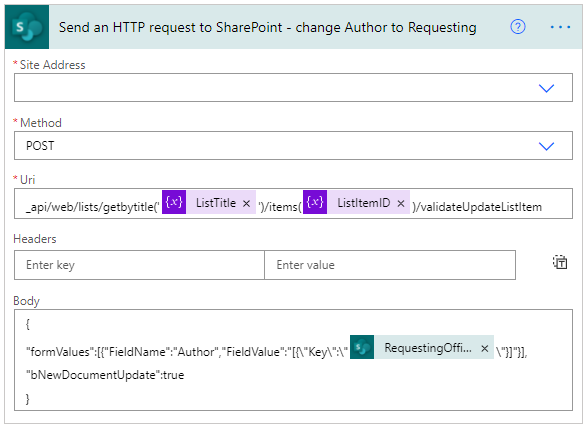
PowerAutomate Flow: Change SPListItem Author without increasing version number

Image
Problem I need to change the Created By (Author) of list item without increasing version number via PowerAutomate Flow but unfortunately there's no predefined action that is ready for use. Solution Use list API via Send an HTTP request to SharePoint action as follows. Note: to prevent new version of list item from being created, set "bNewDocumentUpdate":true   {      "inputs" : {          "host" : {              "connection" : {                  "name" :  "@parameters('$connections')['shared_sharepointonline']['connectionId']"             }         },          "method" :  "post" ,        ...

PowerShell to list Active Directory groups membership

Problem I need a list of AD groups of my colleague's who has left the company so that I can request for similar groups membership. Solution Run the following command on Windows PowerShell Console or PowerShell ISE: (New-Object System.DirectoryServices.DirectorySearcher("(&(objectCategory=User)(samAccountName=$($env:username)))")).FindOne().GetDirectoryEntry().memberOf or (New-Object System.DirectoryServices.DirectorySearcher("(&(objectCategory=User)(samAccountName= YourWindowsLogin ))")).FindOne().GetDirectoryEntry().memberOf