Posts

Electronic Form & Workflow with SharePoint Online Site Column, Calculated Column, Content Approval on Custom List

Problem As a member of Agile Development team, I've been tasked to utilize SharePoint Online custom list to quickly mock-up electronic form, database, workflow and I found interesting features and limitations that SharePoint Developer should be aware of in order to utilize built-in SharePoint functionalities to suit certain use-cases. Findings Site Column Tips It can be hidden from the list form by configuring Site Content Type. Limitation It must be optional to be dynamically hidden via list form Edit columns | Edit conditional formula . Calculated Site Column Tips 1. Calculated site column can be used to include other site column(s) for list view column formatting reference purpose (i.e. =if(1=1,[CalculatedColumnNameToDispayOnListView],[OtherColumnName1]+[OtherColumnName2]...). 2. Name with : suffix (i.e.  Date Submit for Approval: with formula =IF(1=1,IF([Date Submit For Approval]>0,[Date Submit For Approval]," "),[Flow Is Running]+[Form Status]) ) to use on list ...
How to setup SharePoint Online Development Environment (Part 2)

Image
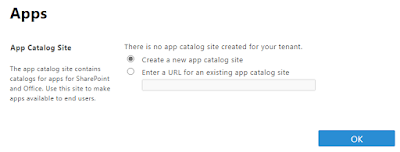
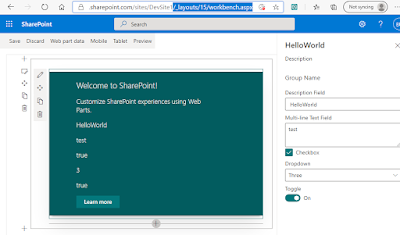
Following Part 1 article on setting up development workstation on Windows, this Part 2 article is for setting up the App Catalog and a Dev site on SharePoint Online, package the webpart, and install the webpart onto the site and page as follows: If you have not setup App Catalog, use the following steps to create an App Catalog site:   Navigate to https:// YourTenantPrefix -admin.sharepoint.com/_layouts/15/online/ManageAppCatalog.aspx       then select OK   Complete the followings as per your preference then select  OK       Create a development site collection:   Navigate to https:// YourTenantPrefix -admin.sharepoint.com/_layouts/15/online/AdminHome.aspx#/siteManagement/view/ALL%20SITES    then select +Create   Select Communication site     Select Blank and complete the followings then select Finish     Package solution for deployment to App Catalog site:   Type the following command o...

How to setup SharePoint Online Development Environment (Part 1)

Image
Problem I need to develop SPFx web-part for SharePoint Online which require new development environment to be setup on my Windows 10 workstation.  Solution Refer to the steps on https://docs.microsoft.com/en-us/sharepoint/dev/spfx/set-up-your-development-environment or use the following summarised steps: Download and install the required (refer to the above link) version of NodeJS installer (i.e. on 24 Feb 2023 it was node-v16.19.1-x64 for Windows 64 bit) which can be downloaded from  https://nodejs.org/dist/latest-v16.x     Run Windows PowerShell or Command prompt and execute the following command to install all prerequisites   npm install gulp-cli yo @microsoft/generator-sharepoint --global and command to allow execution policy (for more info, read  Set-ExecutionPolicy documentation ): Set-ExecutionPolicy -ExecutionPolicy RemoteSigned -Scope CurrentUser Tips: use the following command to check latest version of generator-sharepoint and generato...

How to view items details on SharePoint Recycle bin

Problem Microsoft SharePoint Online recycle bin view displays limited number of character of deleted items. I need to view the fullname of the file but the view column could not be widened. Solution Run PnP PowerShell command as follows: Connect-PnPOnline -Url https://yourtenancy.sharepoint.com/sites/yoursite   -UseWebLogin Get-PnPRecycleBinItem | Select AuthorEmail , AuthorName , DeletedByEmail , DeletedByName , DeletedDateLocalFormatted , DirName , Title | Format-Table -AutoSize

Microsoft Outlook 2019 failed to add Office365 mailbox

Image
Problem I encountered repetitive  Windows Security dialog box and failure when adding my Office365 mailbox to Microsoft Outlook 2019 on Windows 10:   Solution Goto  https://account.activedirectory.windowsazure.com/AppPasswords.aspx   Click create then enter a name (i.e. For Outlook 2019 Desktop ) and click next    Copy the password generated as highlighted below       Paste the password to the Windows Security dialog box  as per the above problem and if successful, the following dialog should appear     Click Done

Log4Net AdoNetAppender using SQL Server Express DB instead of LocalDB

Problem After turning on Log4Net debugging by adding the followings to the windows service project App.config file:   <appSettings>    <add key="log4net.Internal.Debug" value="true"/>   </appSettings>   <system.diagnostics>     <trace autoflush="true">       <listeners>         <add           name="textWriterTraceListener"           type="System.Diagnostics.TextWriterTraceListener"           initializeData="C:\Temp\log4net.log" />       </listeners>     </trace>   </system.diagnostics> Configuring Log4Net AdoNetAppender with LocalDB  has not worked  due to the following error: System.Data.SqlClient.SqlException (0x80131904): Cannot open database "Log4NetDB" requested by the login. The login failed. Login failed for user 'N...

How to reinstall Dell E7440 Laptop

Problem My friend asked for help to reinstall her Dell E7440 laptop that's running Windows 8 Pro however she didn't have the recovery disk. If possible she'd like to have Windows 10 Pro. Solution Reboot the laptop and press F2 to get to the BIOS Setup screen. Get the service tag from BIOS and take note. Download Dell OS Recovery Tool from  https://www.dell.com/support/home/au/en/audhs1/drivers/osiso/recoverytool/wt64a Insert 8GB SDCard then run the executable and when prompted enter the service tag. Reboot the laptop and press F12 to go to boot menu. Select UEFI: SDCARD as the boot drive and follow the installation wizard. After the installation, download Windows 10 installer from  https://www.microsoft.com/en-au/software-download/windows10 Run setup for Windows 10 . When it's complete, the Windows 10 Pro will be already activated with proper licence that comes with the Dell Laptop. Finish. Note: If you encounter any problem with reboot (i.e. n...