Posts

How to migrate SharePoint Online SPWeb with custom SPList form (PowerApps) and Flows

Image
Problem I need to migrate a SPWeb with custom SPList form (PowerApps) within the same SPSite collection. Solution Run the following PnP PowerShell command from Windows PowerShell ISE $TemplateFilePath = "C:\temp\ PnPSiteTemplate_ YourSourceFormSubsiteName .xml " $SourceSiteConnection = Connect-PnPOnline https:// YourTenancy .sharepoint.com/sites/ SharePointForms/PROD/YourSourceFormSubsiteName -Interactive Get-PnPSiteTemplate -Connection $SourceSiteConnection -PersistBrandingFiles -IncludeAllPages -Verbose -Out $TemplateFilePath $TargetSiteConnection = Connect-PnPOnline https:// YourTenancy .sharepoint.com/sites/ SharePointForms/PROD/YourTargetFormSubsiteName -Interactive Invoke-PnPSiteTemplate -Connection $TargetSiteConnection -Path $TemplateFilePath -ClearNavigation Disconnect-PnPOnline Ensure the target copied list is unmodified. Do not rename it or change it until the PowerApps are imported and republished to prevent Data Source confusion after import. Navigate to List s...
How to allow Windows 10 RDP client to connect to older RDP server

Image
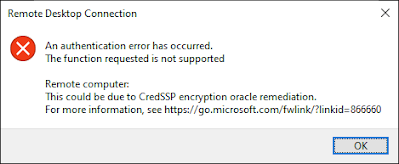
Problem After installing new Windows 10 I encounter the following error when trying to connect to my existing remote server: An authentication error has occured. The function requested is not supported... This could be due to CredSSP encryption oracle remediation... Solution 1. Run gpedit.msc and navigate to the Encryption Oracle Remediation as follows: 3. Change to the following settings and Apply Reference: https://learn.microsoft.com/en-us/troubleshoot/azure/virtual-machines/credssp-encryption-oracle-remediation#scenario-1updated-clients-cannot-communicate-with-non-updated-servers

How to rename your tenancy hostname of SharePoint Online (sharepoint.com)

Problem I need to correct the hostname of SharePoint Online to match my hostname Solution 1. Navigate to https://aka.ms/SPORenameAddDomain 2. Add new domain name, for example YourNewHostName .onmicrosoft.com 3. Run SharePoint Online Management Shell and use the following commands: Connect-SPOService https:// YourCurrentHostName -admin.sharepoint.com Start-SPOTenantRename -DomainName YourNewHostName -ScheduledDateTime "2022-12-16T11:30:00" Note: the scheduled time must be at least 24 hours in the future. The time is your current computer time.

How to search Active Directory group members using Windows 10 built-in tools

Image
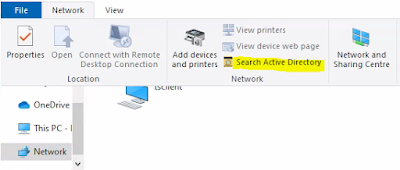
Problem I need to check Active Directory group members but have limited access to install any software on a remote Windows machine running on Windows Virtual Desktop infrastucture. Solution To search for the group name, open  File Explorer | Network | Network | Search Active Directory and if you cannot see the members on the result column, you can run cmd.exe and use the following command to see the members of the Active Directory group: net group THE_AD_GROUP_NAME /domain

How to use Raspberrypi VPN server to wake up other computer

Image
Problem I need to be able to power-on my Theatre PC remotely and securely over my VPN at home. Solution I have already an OpenVPN server installed on Raspberrypi so I just need to install wakeonlan command on Raspbian via the following command: sudo apt install wakeonlan and use the following command to wake up any computer: wakeonlan TheMacAddressOfTheComputerToWakeUp However I'd also like to create a command-shortcut for wakeonlan-theater-pc  so I can edit the hidden   .bashrc file using the nano editor via the following command: nano .bashrc and scroll to the bottom of the file then type the following alias followed by Ctrl-X to exit and save the changes. alias wakeonlan-theatre-pc='wakeonlan  TheMacAddressOfTheComputerToWakeUp ' Finish... all good and it should wake up my computer when I type on the terminal: wakeonlan-theatre-pc

How to use RDP to connect to Ubuntu desktop

Problem I’d like to use RD Client app on iPad instead of VNC Viewer to connect to Ubuntu PC. Solution 1. Use the following command via Terminal or SSH (i.e. Termius on iPad) sudo apt install xrdp 2. Use RD Client on iPad to connect to the IP address of the Ubuntu machine. Lower the setting of display resolution on RD Client if you find the retina resolution is slow. Notes:  To uninstall the xrdp use the following command: sudo apt remove xrdp

Find existing Windows 10 license key

Problem I need to retrieve license key to reinstall my Windows 10 PC, however I can't seem to find it anywhere. Solution Run cmd.exe as administrator and run the following command: wmic path softwareLicensingService get OA3xOriginalProductKey

SharePoint Online as Data Store for Power Apps

Problem I need to design data store for a PowerApp on multiple environments (i.e. DEV/UAT/PROD) using a single SharePoint Online production tenancy. Solution 1. Use a single-site (one environment per SPList) Pro: P1.1. SPList can be copied to another environment via browser UI. P1.2. Site-column internal name (SPList JSON schema) is consistent across all environment. P1.3. Site content-type cascaded update via browser UI will allow refreshing SPList content-type in all environments if required. P1.4. Adding new site-column can be implemented via browser UI. P1.5. Document Library schema can be copied via browser UI leveraging site-content type. P1.6. All environments permissions are managed via Site-Groups within a single-site. Cons: C1.1. Changing existing site-column can accidentally change all environments. C1.2. Changing existing site content-type can accidentally change all environments. C1.3. Site-administrator (Full Control) must ensure lookup site-column is not shared across en...

How to check and reload PAC (Proxy Auto Configuration) file on Windows

Problem I need to check PAC file content being used by Chrome and Internet Explorer on my Windows PC however company administrator has locked down the proxy settings on browser and Windows 10. Solution Run the following command via CMD.EXE on Windows reg query "HKEY_CURRENT_USER\Software\Microsoft\Windows\CurrentVersion\Internet Settings" /f AutoConfigUrl To force Chrome to reload PAC file, use the following URL and click Clear bad proxies followed by Re-apply settings chrome://net-internals/proxyservice.config#proxy For Internet Explorer, you may need to reboot Windows for the PAC file to reload via Active-Directory Group-Policy.

PowerAutomate Flow: Change SPListItem Author without increasing version number

Image
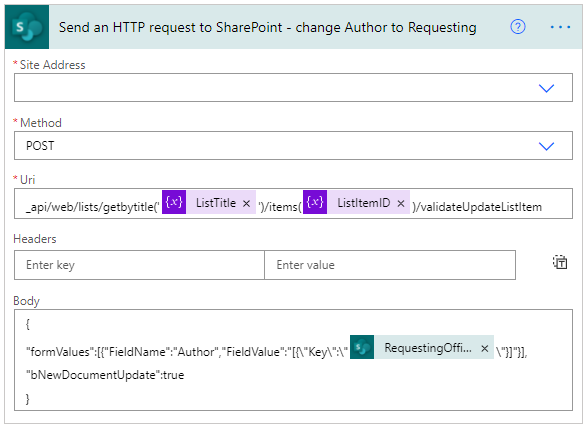
Problem I need to change the Created By (Author) of list item without increasing version number via PowerAutomate Flow but unfortunately there's no predefined action that is ready for use. Solution Use list API via Send an HTTP request to SharePoint action as follows. Note: to prevent new version of list item from being created, set "bNewDocumentUpdate":true   {      "inputs" : {          "host" : {              "connection" : {                  "name" :  "@parameters('$connections')['shared_sharepointonline']['connectionId']"             }         },          "method" :  "post" ,        ...

PowerShell to list Active Directory groups membership

Problem I need a list of AD groups of my colleague's who has left the company so that I can request for similar groups membership. Solution Run the following command on Windows PowerShell Console or PowerShell ISE: (New-Object System.DirectoryServices.DirectorySearcher("(&(objectCategory=User)(samAccountName=$($env:username)))")).FindOne().GetDirectoryEntry().memberOf or (New-Object System.DirectoryServices.DirectorySearcher("(&(objectCategory=User)(samAccountName= YourWindowsLogin ))")).FindOne().GetDirectoryEntry().memberOf

Electronic Form & Workflow with SharePoint Online Site Column, Calculated Column, Content Approval on Custom List

Problem As a member of Agile Development team, I've been tasked to utilize SharePoint Online custom list to quickly mock-up electronic form, database, workflow and I found interesting features and limitations that SharePoint Developer should be aware of in order to utilize built-in SharePoint functionalities to suit certain use-cases. Findings Site Column Tips It can be hidden from the list form by configuring Site Content Type. Limitation It must be optional to be dynamically hidden via list form Edit columns | Edit conditional formula . Calculated Site Column Tips 1. Calculated site column can be used to include other site column(s) for list view column formatting reference purpose (i.e. =if(1=1,[CalculatedColumnNameToDispayOnListView],[OtherColumnName1]+[OtherColumnName2]...). 2. Name with : suffix (i.e.  Date Submit for Approval: with formula =IF(1=1,IF([Date Submit For Approval]>0,[Date Submit For Approval]," "),[Flow Is Running]+[Form Status]) ) to use on list ...

How to setup SharePoint Online Development Environment (Part 2)

Image
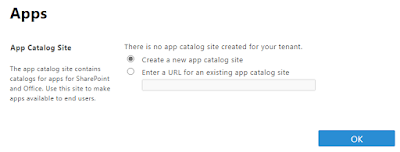
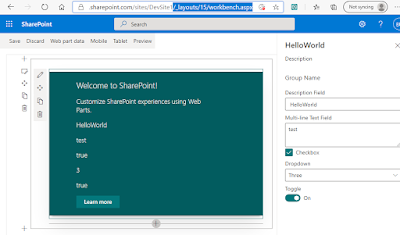
Following Part 1 article on setting up development workstation on Windows, this Part 2 article is for setting up the App Catalog and a Dev site on SharePoint Online, package the webpart, and install the webpart onto the site and page as follows: If you have not setup App Catalog, use the following steps to create an App Catalog site:   Navigate to https:// YourTenantPrefix -admin.sharepoint.com/_layouts/15/online/ManageAppCatalog.aspx       then select OK   Complete the followings as per your preference then select  OK       Create a development site collection:   Navigate to https:// YourTenantPrefix -admin.sharepoint.com/_layouts/15/online/AdminHome.aspx#/siteManagement/view/ALL%20SITES    then select +Create   Select Communication site     Select Blank and complete the followings then select Finish     Package solution for deployment to App Catalog site:   Type the following command o...

How to setup SharePoint Online Development Environment (Part 1)

Image
Problem I need to develop SPFx web-part for SharePoint Online which require new development environment to be setup on my Windows 10 workstation.  Solution Refer to the steps on https://docs.microsoft.com/en-us/sharepoint/dev/spfx/set-up-your-development-environment or use the following summarised steps: Download and install the required (refer to the above link) version of NodeJS installer (i.e. on 24 Feb 2023 it was node-v16.19.1-x64 for Windows 64 bit) which can be downloaded from  https://nodejs.org/dist/latest-v16.x     Run Windows PowerShell or Command prompt and execute the following command to install all prerequisites   npm install gulp-cli yo @microsoft/generator-sharepoint --global and command to allow execution policy (for more info, read  Set-ExecutionPolicy documentation ): Set-ExecutionPolicy -ExecutionPolicy RemoteSigned -Scope CurrentUser Tips: use the following command to check latest version of generator-sharepoint and generato...

How to view items details on SharePoint Recycle bin

Problem Microsoft SharePoint Online recycle bin view displays limited number of character of deleted items. I need to view the fullname of the file but the view column could not be widened. Solution Run PnP PowerShell command as follows: Connect-PnPOnline -Url https://yourtenancy.sharepoint.com/sites/yoursite   -UseWebLogin Get-PnPRecycleBinItem | Select AuthorEmail , AuthorName , DeletedByEmail , DeletedByName , DeletedDateLocalFormatted , DirName , Title | Format-Table -AutoSize

Microsoft Outlook 2019 failed to add Office365 mailbox

Image
Problem I encountered repetitive  Windows Security dialog box and failure when adding my Office365 mailbox to Microsoft Outlook 2019 on Windows 10:   Solution Goto  https://account.activedirectory.windowsazure.com/AppPasswords.aspx   Click create then enter a name (i.e. For Outlook 2019 Desktop ) and click next    Copy the password generated as highlighted below       Paste the password to the Windows Security dialog box  as per the above problem and if successful, the following dialog should appear     Click Done

Log4Net AdoNetAppender using SQL Server Express DB instead of LocalDB

Problem After turning on Log4Net debugging by adding the followings to the windows service project App.config file:   <appSettings>    <add key="log4net.Internal.Debug" value="true"/>   </appSettings>   <system.diagnostics>     <trace autoflush="true">       <listeners>         <add           name="textWriterTraceListener"           type="System.Diagnostics.TextWriterTraceListener"           initializeData="C:\Temp\log4net.log" />       </listeners>     </trace>   </system.diagnostics> Configuring Log4Net AdoNetAppender with LocalDB  has not worked  due to the following error: System.Data.SqlClient.SqlException (0x80131904): Cannot open database "Log4NetDB" requested by the login. The login failed. Login failed for user 'N...

How to reinstall Dell E7440 Laptop

Problem My friend asked for help to reinstall her Dell E7440 laptop that's running Windows 8 Pro however she didn't have the recovery disk. If possible she'd like to have Windows 10 Pro. Solution Reboot the laptop and press F2 to get to the BIOS Setup screen. Get the service tag from BIOS and take note. Download Dell OS Recovery Tool from  https://www.dell.com/support/home/au/en/audhs1/drivers/osiso/recoverytool/wt64a Insert 8GB SDCard then run the executable and when prompted enter the service tag. Reboot the laptop and press F12 to go to boot menu. Select UEFI: SDCARD as the boot drive and follow the installation wizard. After the installation, download Windows 10 installer from  https://www.microsoft.com/en-au/software-download/windows10 Run setup for Windows 10 . When it's complete, the Windows 10 Pro will be already activated with proper licence that comes with the Dell Laptop. Finish. Note: If you encounter any problem with reboot (i.e. n...

How to restart VirtualBox VM to certain snapshot via Ubuntu Terminal

Problem I need to restart my VirtualBox headless Virtual Machine and restore it to certain snapshot on every restart. Solution 1. On Ubuntu terminal type the following commands to create a bash script as follows: cd /user/bin sudo nano vboxmanage-restartMyVM 2. On the nano editor type the followings: vboxmanage controlvm " YourVMName " poweroff vboxmanage snapshot " YourVMName " restore " YourVMSnapshotName " vboxmanage startvm " YourVMName " -type headless 3. Press Ctrl-S to save the file and Ctrl-X to exit the editor and return to Ubuntu terminal. 4. Type the following command to allow the script to be executable sudo chmod +x vboxmanage-restartMyVM 5. Finish. Now everytime I type  vboxmanage-restartMyVM  on the Ubuntu terminal my virtual machine will be powered-off if it's on, restored to my preferred snapshot, then started. Happy day😀

How to replace battery of Honda Jazz Remote Key

Image
I've just replaced the battery on my Honda Jazz Remote Key. The coin lithium battery type is CR1616. The following video shows how I did it: